Activity 05
Introduction to Adobe Illustrator
| Assigned | Due | Submit |
|---|---|---|
10/15/26 |
10/19/26 |
https://universityofrichmond.instructure.com/courses/17668/assignments/151644 |
This activity introduces you to Adobe Illustrator. First, you will watch a video tutorial introducing the Adobe Illustrator interface. Then, after exploring the Illustrator interface on your own, you’ll download and open an Adobe Illustrator file and complete three tasks. Instructions are below.
Part 1
Watch this video and follow along:
Part 2
Make a new document Spend a few minutes in Adobe Illustrator (you don’t have to save it). Just play around for a bit and try a couple of these keystrokes:
- Hold down the
altkey while scrolling the mouse wheel to zoom in/out v: Open the “Selection” toolp: Open the “Pen” toolt: Open the “Type” toolctrl+z: Undo
See below for a full list of keystrokes:
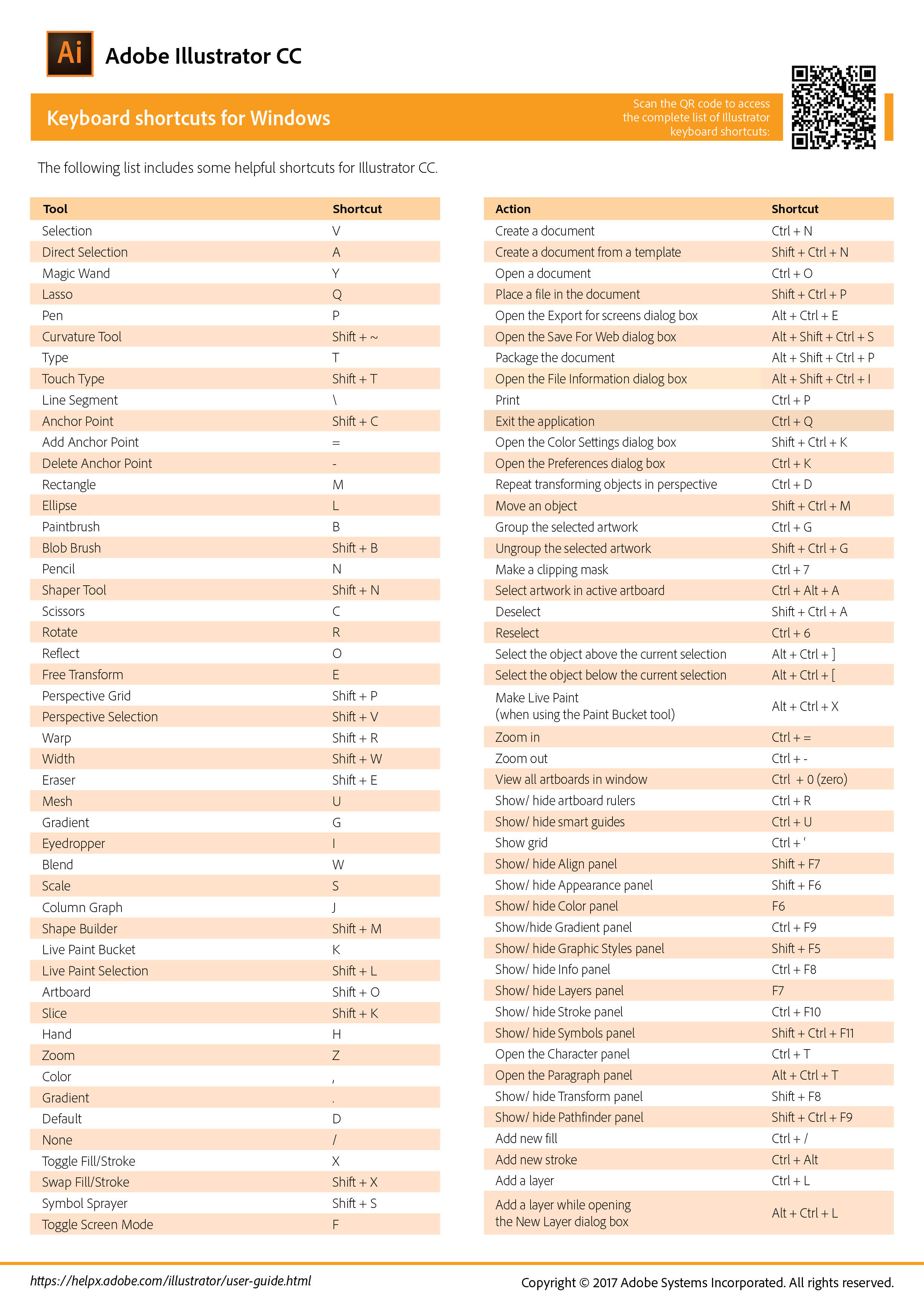
Part 3
Click here to download the activity-5.ai file. Follow these instructions:
- Make sure your Layer panel is open. If it is not open, go to Window and select Layers. You may also want to add the Color, Stroke, and Character (under Type) panels.
- In your Layer panel, there are three layers. Each layer corresponds to a specific task (Tasks 1–3). “Unlock” each layer to complete each task. For example, to complete Task 1, unlock the “Task 1: Add Your Name” layer and create textuse the “Type” tool. Highlight the Task 1: Add Your Name layer when you add your name to make sure your name is located underneath the correct layer. Remember that you can drag layers and features within layers around if needed.
- When you’re finished Tasks 1-3, create a new layer and name it “Task 4: Background”. Draw a rectangle (open by typing
m) that is the size of the page layout. Give it a color and remove its stroke. Drag this new layer below Tasks 1–3 in the Layers panel. This will ensure that everything you created above is visible.
Deliverables
| Assigned | Due | Submit |
|---|---|---|
10/15/26 |
10/19/26 |
https://universityofrichmond.instructure.com/courses/17668/assignments/151644 |
Save this Adobe Illustrator document with a new name that is specific to you, e.g., spangler_activity-05.ai, and submit it to Canvas by Tuesday 10/19/26.