City council district profiles
Visualize spatial relationships and key details about city council districts in RVA
| Assigned | Due | Submit |
|---|---|---|
9/30/26 |
10/13/26 |
In this assignment, you’ll build on the work that you started in Lab 2. As a member of the Richmond Civic Data Collaboratory, you’ve just finished crunching a bunch of census data about the city. The goal is to produce a series of visualizations—one for each city council district—highighting who lives there and why they should care about
The original graphic
We’ll use this graphic as a starting point:
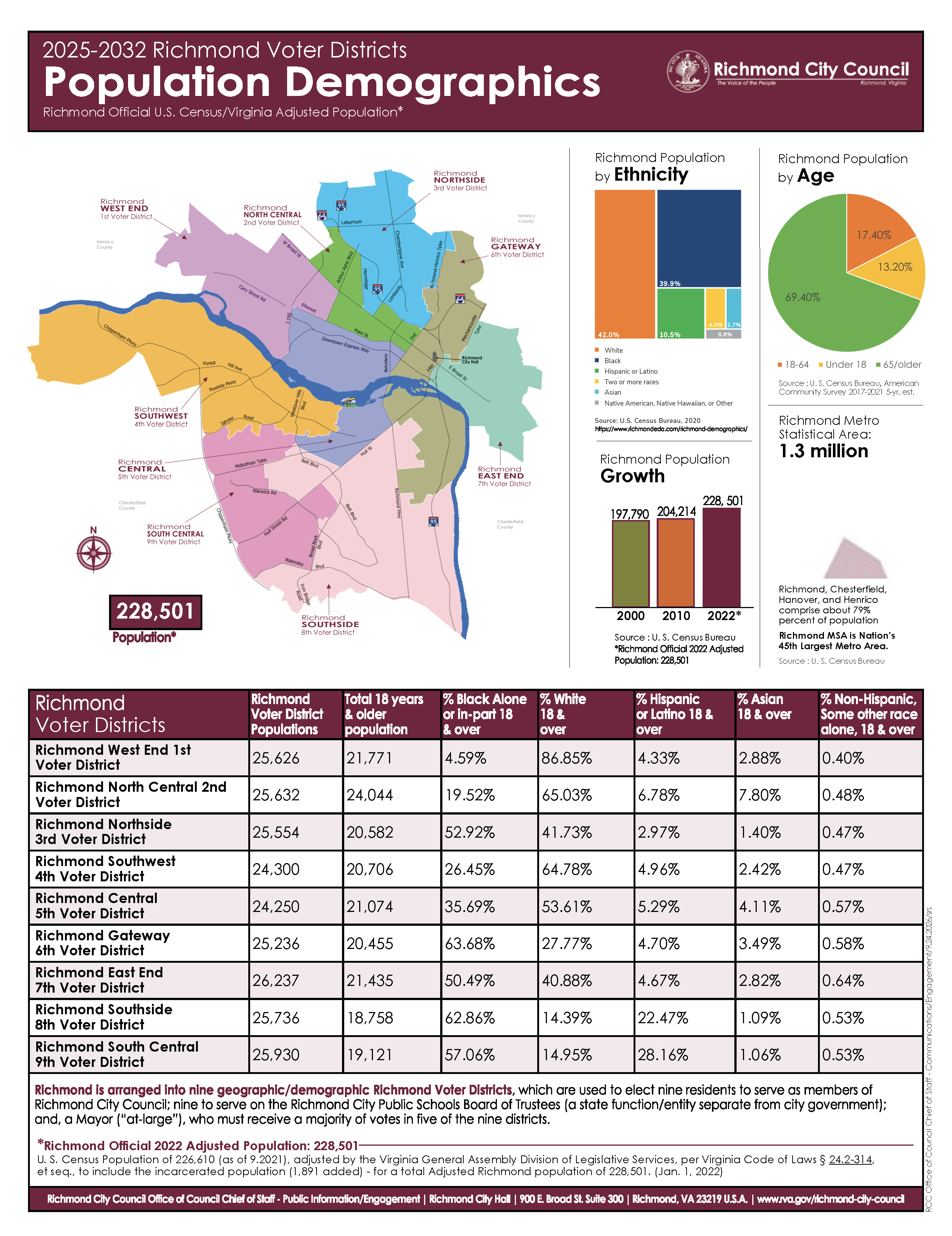
This graphic does a lot of things well, but we’re going to give it a refresh with an eye towards removing the dense summary statistics and introducing some snappier maps, lighter graphics, and more community-oriented text. Also, our visualizations will be primarily oriented towards highlighting characteristics of a single district (rather than highlighting each district’s characteristics within the entire city).
Specifically, we are responding to these needs from our community partner:
- Aggregate census data to city council districts
- Display summary data with graphical brevity and clarity
- Connect city council districts to the neigbhorhoods they include
- Highlight information on housing, education, and other social vulnerability metrics
The audience
As you craft your graphic, imagine that your audience are neighborhood residents—everyday people who care about their city, but may not know that much about city council districts (maybe they don’t even know which one they live in!).
Think about the scenarios by which residents might use these district profiles, for example, as evidence when making arguments about capital project improvements to their coucilors or mayor. The goal is to provide meaningful information, briefly and clearly.
Your template
For this assignment, you should get started by following a template. You can download it on hemisphere from the GEOG248/_data folder (it’s the .pagx file).
The template is an 8.5” x 11” portrait layout divided into three rows, organized according to the elements you must include in the final product:
- The top row provides geographical and demographic context for the district (where is it, who lives there)
- The middle row goes deeper into some variables of your choice with more graphics and charts
- The bottom row highlights a civic community resource
Inspiration
This set of district profile graphics from Austin in 2024 are closer to what we’re getting at in this project. Take a look through these for graphic and layout inspiration!
Style guide
For this assignment, we’ll follow the guidelines published by the University’s brand center. These include:
- Color
- Typography (we’ll be using the recommended substitute typefaces)
- Logos
- Graphic elements
This desktop style file contains UR’s primary and secondary color palettes; I recommend loading it into your project for easy access to the colors.
Elements that must be included
Each visualization should include:
- Three maps! Across these maps, null values should be appropriately represented (e.g., included and not depicted as
0).- One map that locates the council district within Richmond
- One map that locates neighborhoods within the district. Use this shapefile for neighborhoods!
- One map that shows median home value OR median household income, by block group, for only your district
- Three additional data graphics: These could be charts, more maps, or something else that conveys a key data point about your district. You can reference your district in relation to others (e.g., “The median home value in my district is higher/lower than the city average”), but the key focus should be on your district. These graphics should reference 3 of the 6 variable groups that we crunched in Lab 2 (race, sex, housing tenure, travel-to-work, commuting mode, educational attainment). You might be able to make these in ArcGIS Pro, but it might be easier to, for instance, copy data out of Arc, make a pie chart in Excel, and load it back in as an image.
- Interpretive and explanatory text: All of the graphic resources should include some text that explains what somebody is seeing. The text should be concise, use plain language, and be inviting/welcoming in tone.
- Civic community resource: You should find and include one “civic community resource” and display an image, plus some basic information about it, in the visualization. This could be a historical fact about the place, an image of the landscape, a contemporary civic institution (like a public library, community garden, etc.), or something else entirely. But the idea here is to connect the faceless statistics of census data with the actual places where people live.
- Logos: Include logos where appropriate, like the SAL’s logo, the City of Richmond emblem, and the University shield.
Deliverables
| Assigned | Due | Submit |
|---|---|---|
9/30/26 |
10/13/26 |
The final layout is due via Canvas, in PDF format, by 10/13/26. Happy mapping!